

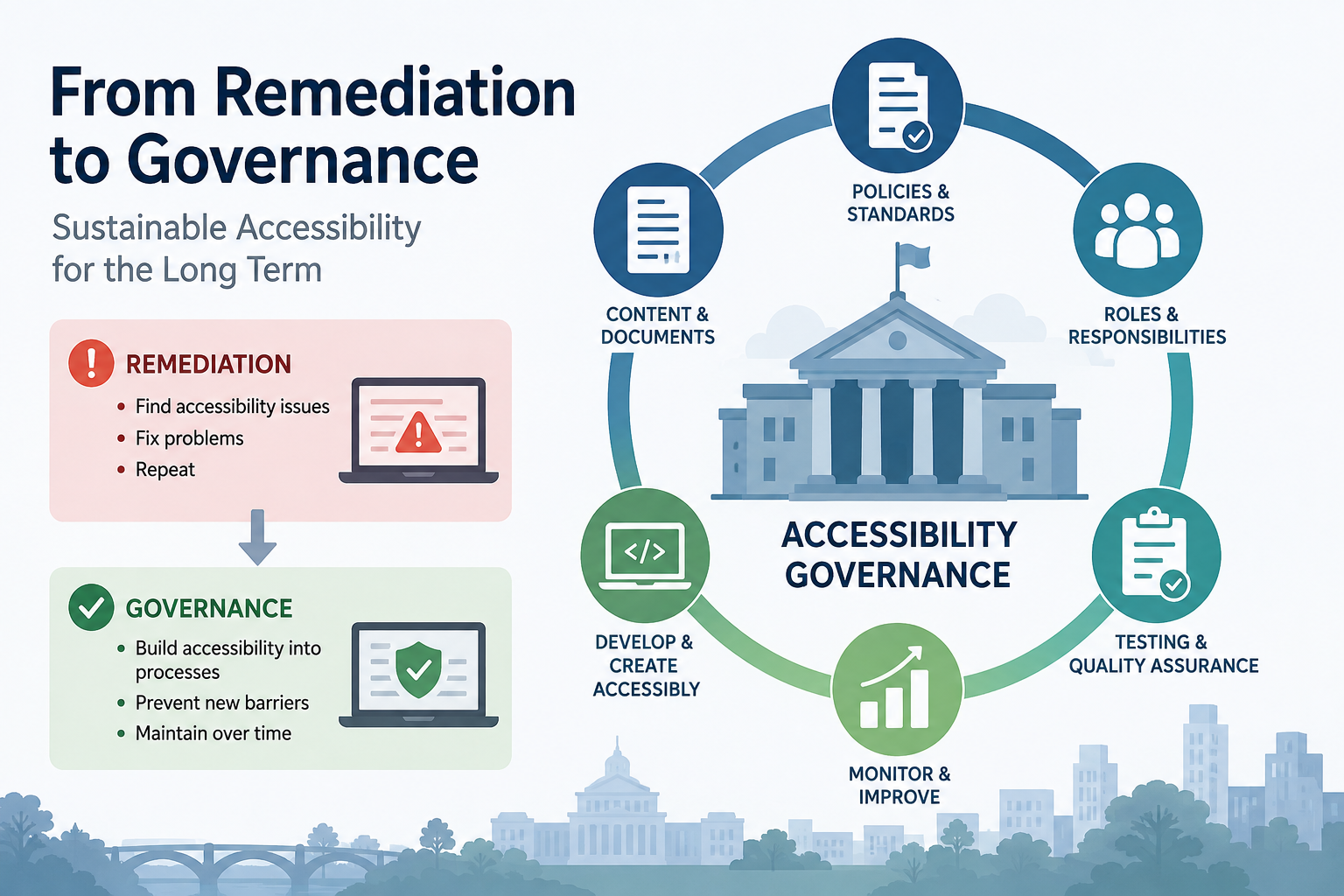
For government agencies working toward ADA Title II, Section 508, and WCAG compliance, fixing existing website accessibility problems is only the beginning.
Many organizations begin their accessibility compliance efforts with a major push: conduct a WCAG accessibility audit, fix accessibility issues, remediate PDFs, correct forms, and address barriers for people with disabilities.
Eventually, the website is in pretty good shape.
And then:
- someone uploads a new inaccessible PDF
- a vendor adds a widget that can’t be operated with a keyboard
- a content editor creates headings based on how they look rather than the page structure
- a new form launches without accessibility testing
Six months later, the organization discovers that its website has quietly begun accumulating accessibility problems again.
That’s why mature digital accessibility programs eventually need to make an important transition:
From accessibility remediation to accessibility governance.
The question is no longer simply, “Is our website accessible?”
It’s “Do we have systems in place to keep our website accessible?”
What Is Accessibility Governance?
Accessibility governance is the collection of policies, processes, responsibilities, testing practices, and quality controls an organization uses to maintain digital accessibility over time.
Instead of periodically finding and fixing accessibility problems, the organization builds accessibility into the way websites, documents, applications, and other digital content are created, procured, tested, and maintained.
For public agencies, this becomes particularly important because digital content doesn’t stop changing after an accessibility remediation project is complete.
A sustainable accessibility program needs to account for those changes.
Title II and Section 508 Compliance Require an Ongoing Strategy
ADA Title II applies to state and local governments, while Section 508 of the Rehabilitation Act establishes accessibility requirements for federal agencies and can also become relevant to other organizations through contracts and other requirements.
While the specific legal obligations differ, the operational challenge is similar:
How do you prevent new accessibility barriers from appearing after you’ve fixed the old ones?
For state and local governments preparing for the ADA Title II web and mobile app accessibility requirements, that question is becoming especially important. Meeting the applicable WCAG standard at one point in time isn’t enough if tomorrow’s content introduces new barriers.
The same principle applies to organizations managing Section 508 compliance. Accessibility needs to be integrated into everyday operations, including content creation, procurement, development, document production, testing, and quality assurance.
That’s where accessibility governance comes in.
Build Accessibility Into Content Governance
Website accessibility needs to become part of the normal publishing process—not something that happens after content goes live.
Organizations should establish clear accessibility requirements for new and substantially revised web content, including who is responsible for accessibility and when specialist review is required.
That doesn’t mean every content editor needs to become a WCAG expert. It means people need appropriate training, accessible templates, authoring tools, and a clear way to get help when they encounter something beyond their expertise.
It also means periodically asking whether content still belongs on the website at all.
Old pages, abandoned microsites, outdated documents, and unnecessary interactive features don’t just create maintenance headaches. They increase the organization’s accessibility footprint.
Sometimes the easiest accessibility problem to fix is the content you don’t need anymore.
Ask: Does This Really Need to Be a PDF?
PDF accessibility deserves particular attention in an accessibility compliance program.
Before creating another PDF, ask a simple question:
Could this information be an accessible web page instead?
HTML content is generally easier to make accessible, maintain, update, use on mobile devices, and find through search engines.
That doesn’t mean eliminating PDFs. Some documents genuinely belong in document format. But organizations should establish criteria for when PDFs are appropriate—and what accessibility review they require before publication.
Existing PDFs can also be prioritized based on usage, importance, legal requirements, and likelihood of public need.
Website analytics can help. A PDF downloaded thousands of times deserves particular attention. A seven-year-old document nobody has accessed in two years may be a candidate for removal or archiving instead.
A Tagged PDF Isn’t Necessarily an Accessible PDF
Organizations also need to evaluate whether their document accessibility processes are actually working.
Providing employees with an accessible Word template, PDF accessibility software, or document accessibility training does not necessarily result in accessible documents.
And a tagged PDF is not automatically an accessible PDF.
Periodically test the files being produced by subject matter experts and content teams.
Are headings structured correctly? Are tables understandable? Is the reading order correct? Is alternative text meaningful? Are links and form fields accessible?
The goal isn’t simply to determine whether employees followed the accessibility process.
It’s to determine whether the process actually produces accessible documents.
Establish Ongoing Website Accessibility Testing
Accessibility isn’t something an organization can test once and declare finished.
A sustainable ADA Title II, Section 508, or WCAG compliance program should establish how continued accessibility will be verified.
Depending on the organization, that might include:
- Automated accessibility monitoring
- Quarterly or periodic WCAG accessibility audits
- Manual accessibility testing of representative pages
- Keyboard and screen reader testing of critical workflows
- Expert accessibility review of certain PDFs and documents
- Accessibility testing before major website releases
- Periodic review of third-party tools and integrations
Automated accessibility testing is valuable, but it cannot identify every WCAG failure. Automated testing should be combined with appropriate manual accessibility testing.
Organizations should also test complete user journeys—not just individual pages.
Can someone using only a keyboard find a service, understand the instructions, complete the application, upload a document, submit the form, and understand the confirmation?
A homepage with zero automated accessibility errors doesn’t mean much if someone with a disability can’t actually use the government service they came to access.
Use Website Analytics to Prioritize Accessibility
Website analytics can be surprisingly useful for accessibility compliance.
Start by identifying high-traffic pages, frequently downloaded documents, and critical user journeys. These are obvious candidates for ongoing accessibility testing.
For interactive features, consider adding analytics events to determine whether visitors actually use them.
If thousands of people use a particular map, calculator, filtering tool, or interactive feature, make sure it is fully accessible.
If virtually nobody uses it, ask a different question:
Why are we maintaining it at all?
Removing unnecessary functionality reduces website complexity for everyone—and eliminates another potential source of accessibility barriers.
Analytics shouldn’t be the only way accessibility work is prioritized, however.
A page used by only 50 people may still be critically important if those visitors are applying for disability services, requesting emergency assistance, or accessing another essential government program.
Think in terms of usage plus impact.
Include Accessibility in Procurement and Vendor Management
Third-party technology is one of the easiest ways for accessibility problems to enter an otherwise accessible website.
Accessibility requirements should appear in RFPs, scopes of work, contracts, and acceptance criteria—not just in an organization’s accessibility policy.
And don’t stop at asking vendors whether their products are “WCAG compliant” or “Section 508 compliant.”
Require evidence.
For important systems, organizations should critically review VPATs and Accessibility Conformance Reports (ACRs) and independently evaluate vendor accessibility claims when appropriate.
Most importantly, perform accessibility testing before accepting and launching the product.
Accessibility defects should be treated like other defects discovered during quality assurance—not as problems the organization agrees to inherit when the product launches.
Measure Whether Accessibility Training Actually Works
Accessibility training is important.
But training completed is not the same thing as accessibility achieved.
Instead of only measuring how many employees attended accessibility training, examine the work they’re producing afterward.
- Are new PDFs accessible?
- Are content editors using headings correctly?
- Are developers introducing fewer WCAG failures?
- Are procurement teams asking vendors the right accessibility questions?
If not, the organization may need better templates, different tools, additional training, or changes to the workflow itself.
Accessibility governance means measuring outcomes, not just activities.
Learn From Your Accessibility Audits
Website accessibility audits shouldn’t produce reports that disappear into a folder.
Track recurring accessibility issues.
If every quarterly audit finds inaccessible tables, that’s not ten separate table problems.
It’s evidence of a systemic problem.
Maybe the content management system makes tables difficult to create correctly. Maybe employees need better training. Maybe the organization’s templates are flawed.
Fix the system that keeps producing the accessibility issue.
Over time, accessibility metrics can also become more sophisticated. Instead of simply counting WCAG failures, organizations can track measures such as:
- Percentage of critical user journeys manually tested
- Percentage of new PDFs passing accessibility QA
- Recurring accessibility defect rates
- Accessibility issues introduced after website updates
- Time required to resolve reported accessibility barriers
- Percentage of third-party products evaluated for accessibility before launch
Website Accessibility Compliance Is an Ongoing Process
The most mature accessibility programs aren’t the ones that never find an accessibility problem.
Websites, documents, applications, and third-party systems change too quickly for that.
They’re the organizations that find accessibility problems, correct them, learn from them, and make it harder for the same problems to happen again.
Whether your organization is focused on ADA Title II compliance, Section 508 compliance, WCAG compliance, or broader digital accessibility, that’s the real shift from remediation to governance.
Stop asking:
“Did we make the website accessible?”
Start asking:
“Have we built an organization that knows how to keep it accessible?”